Sacramento Font for Cricut
Generate a Sacramento name SVG with a relaxed, monoline handwriting style.
Design your name
Loading the selected font…
1–24 inches. Height scales with the design.
Move left to bring letters closer. The finished width stays fixed; detached dots and spaces may remain.
Remove cut lines where letters overlap. Spaces and detached marks keep their positions.
Sacramento · SIL OFL 1.1 · Commercial use allowed.
Your name stays in this browser.
Cut preview
2 cut piecesCutting with Sacramento
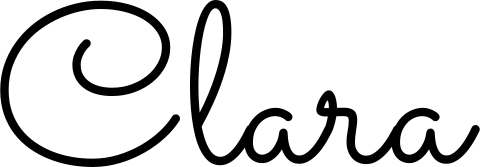
Begin at 5 inches for a notebook cover. Some capitals sit apart from the lowercase letters, so keep the pieces in position on transfer tape.
Place relaxed handwriting on a notebook
- Measure a clear area on the cover, leaving space around the binding and any elastic closure.
- Preview the first capital beside the lowercase letters. Reduce spacing only if you want them to touch.
- Use transfer tape to keep any separated letters aligned, then apply the name to a clean surface suitable for your vinyl.
Works with your cutting app
Upload the outlined SVG to Cricut Design Space or Silhouette Studio Designer Edition and above. No font installation is needed. Confirm the finished dimensions in the app before cutting.
Silhouette Studio Basic cannot open SVG. Download the transparent PNG instead, open it in Studio, then use the Trace panel to create cut lines. Check the inner letter holes and set the intended width after tracing.
See Silhouette’s Basic Edition and tracing guide and SVG import requirements.
Check the fine details
A fine-detail warning means some strokes may be too narrow for a clean cut. Try a larger width or a bolder font, and test a scrap of your actual material. The estimate is a guide, not a guarantee.
Weld joins overlapping shapes but does not bridge gaps. Keep detached dots and separate words aligned with transfer tape; cardstock projects may need a backing added in your cutting app.
For iron-on, mirror in your cutting app when the material requires it. These downloads are not mirrored.
Questions about Sacramento
Why is my Sacramento capital still a separate piece?
Some capitals are drawn with a gap before the next letter. Welding removes existing overlaps but does not create a connecting stroke.
Is Sacramento a single-line writing font?
No. This tool exports the closed outer edges of the font. A pen follows those edges, so a cut outline is not the same as a single-line handwriting path.
See measured font comparisons and how to connect cursive letters
Batch for Etsy sellers (coming soon)
Would a list of names turned into individual SVG files save you time? Tell us you are interested in a possible trial. Batch generation is not available yet.
No payment or email signup. If you allow usage analytics, your click counts anonymous interest. Check this page for a future trial.
Fonts you can use commercially
All 11 bundled fonts use the SIL Open Font License 1.1. The SVG contains your design’s outlines, not embedded font software. Keep the original license with any font files you redistribute.
- PacificoScript · SIL OFL 1.1
- Great VibesScript · SIL OFL 1.1
- LobsterScript · SIL OFL 1.1
- AlluraScript · SIL OFL 1.1
- SacramentoScript · SIL OFL 1.1
- Kaushan ScriptScript · SIL OFL 1.1
- CookieScript · SIL OFL 1.1
- CourgetteScript · SIL OFL 1.1
- Manrope BoldBold sans · SIL OFL 1.1
- Instrument SerifSerif · SIL OFL 1.1
- Nunito ExtraBoldRounded · SIL OFL 1.1