Make cursive letters blend into one word — welded name SVG
Yes. Type the name, choose one of eight script fonts, keep Weld overlapping letters on and download a free SVG for Cricut Design Space. Weld joins letters that already overlap, so watch the cut piece count; dots and gaps stay separate. All fonts are SIL OFL 1.1, so commercial use is allowed.
Free · no account SVG + 300 DPI PNG Commercial-use fonts (OFL)
Design your name
Loading the selected font…
1–24 inches. Height scales with the design.
Move left to bring letters closer. The finished width stays fixed; detached dots and spaces may remain.
Remove cut lines where letters overlap. Spaces and detached marks keep their positions.
Pacifico · SIL OFL 1.1 · Commercial use allowed.
Your name stays in this browser.
Cut preview
1 cut pieceWhy cursive letters don’t connect in Design Space
Cursive letters can look connected while their outlines still contain overlap cuts or small gaps. Weld removes cut lines only where strokes already overlap; adjust letter spacing while watching the piece count.
How to get one connected piece
- Type the name you want to cut.
- Choose one of the eight script fonts.
- Keep “Weld overlapping letters” on.
- Move letter spacing left until the piece count drops, checking that letter holes stay open.
- Set the finished width between 1 and 24 inches.
- Download SVG and upload it in Design Space using Upload → Upload Image on desktop.
- Cut a test piece in your chosen material.
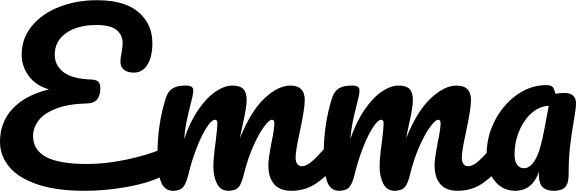
Which cursive fonts weld into one piece?
Measured November 11, 2026 with the same outline engine and bundled fonts as the tool: 6 inches wide, 0 em letter spacing, Weld on. A piece is one connected outer shape; inner holes are not additional pieces. Different names or spacing can change the count.
| Script font | Emma | Olivia | Madison |
|---|---|---|---|
| Pacifico | 1 | 4 | 2 |
| Great Vibes | 2 | 4 | 3 |
| Lobster | 1 | 5 | 3 |
| Allura | 2 | 5 | 5 |
| Sacramento | 2 | 3 | 3 |
| Kaushan Script | 4 | 8 | 8 |
| Cookie | 1 | 3 | 2 |
| Courgette | 4 | 8 | 8 |
When Weld can't connect a letter
Weld does not bridge gaps, and dots on i and j stay separate. Reduce letter spacing carefully or choose another font when a capital does not touch the next letter; use transfer tape to keep detached pieces in position.
This tool has no split monogram feature, and batch generation is not available. Downloads are not mirrored; mirror iron-on designs in Design Space when your material requires it. Only the 11 built-in fonts are available; you cannot upload your own font.
Facts
| Input | One name or short line, up to 40 characters; 11 bundled fonts including 8 scripts |
|---|---|
| Finished width | 1–24 inches; height scales proportionally, with inches and millimetres shown |
| Letter spacing | −0.15 to 0.4 em; finished width stays fixed |
| Weld | Joins overlapping outlines, preserving inner holes; separate dots and gaps remain |
| Output | Closed-path SVG without text/font references; transparent PNG at 300 DPI; not mirrored |
| Price and processing | Free single-name downloads, no account or subscription; your name stays in this browser |
| License | All bundled fonts use SIL OFL 1.1, permitting commercial use |
| Cutting apps | SVG: Cricut Design Space or Silhouette Studio Designer Edition and above; Basic edition needs PNG tracing |
Cricut's desktop help uses Upload → Upload Image; its October 2026 release notes describe a newer Upload panel, so the exact layout can vary by version. Official upload guide · Release notes · checked 2026-11-11.
Contour can hide cut lines; Flatten makes selected layers printable. Check the cut paths and inner holes before cutting; no physical cut or Design Space import is guaranteed by a preview.
Questions about cursive name svg, welded for cricut — free download
How do I make cursive fonts blend together into one word?
Keep Weld overlapping letters on and move letter spacing left while watching the cut piece count. Weld joins overlapping strokes but cannot bridge gaps, so try a different script font if the letters still do not touch. Check the preview and cut a test before making the final piece.
Why are the insides of my letters not cutting?
FontKite exports closed outlines with inner holes retained. After upload, check that Contour has not hidden an inner cut line and that the design is still a cut shape; Flatten turns selected layers into a printable image. Preview the cut paths before sending the design to your machine.
Do I need to install the font?
No. The SVG contains closed paths, with no text elements or external font references. It keeps the exported outline when you import it on another computer.
Can I sell decals made with these fonts?
Yes. All 11 bundled fonts use SIL OFL 1.1, which allows commercial use. Your design content must also be yours to use, and the original license notices must accompany any font files you redistribute.
Why does the dot on my "i" stay separate?
Weld joins only touching or overlapping shapes; it does not draw a bridge to a detached dot on an i or j. Keep the dot aligned with transfer tape, or add a supporting shape in your cutting app if your project needs one solid piece.
Is it free?
Single-name SVG and transparent PNG downloads are free without an account or subscription. Batch generation is not available; the coming-soon section has no checkout.
Batch for Etsy sellers (coming soon)
Would a list of names turned into individual SVG files save you time? Tell us you are interested in a possible trial. Batch generation is not available yet.
No payment or email signup. If you allow usage analytics, your click counts anonymous interest. Check this page for a future trial.
Fonts you can use commercially
All 11 bundled fonts use the SIL Open Font License 1.1. The SVG contains your design’s outlines, not embedded font software. Keep the original license with any font files you redistribute.
- PacificoScript · SIL OFL 1.1
- Great VibesScript · SIL OFL 1.1
- LobsterScript · SIL OFL 1.1
- AlluraScript · SIL OFL 1.1
- SacramentoScript · SIL OFL 1.1
- Kaushan ScriptScript · SIL OFL 1.1
- CookieScript · SIL OFL 1.1
- CourgetteScript · SIL OFL 1.1
- Manrope BoldBold sans · SIL OFL 1.1
- Instrument SerifSerif · SIL OFL 1.1
- Nunito ExtraBoldRounded · SIL OFL 1.1